


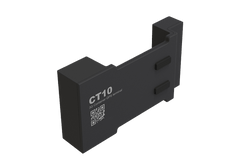
Jimi Iot LL306 4G LTE Container GNSS Tracker
"Amazing"




 and 758 people purchased
Loved product! 1.1M people favorited it!
Please hurry! Only 0 left in stock
Subtotal:
650 SR
- 650 SR
1,150 SR- 650 SR
- Unit price
- per
10 customers are viewing this product
Couldn't load pickup availability
Free Shipping
Enjoy Free Shipping On ALL Over Orders🚚
Estimated to be delivered within 2 to 8 days
Free Returns
Learn More.

Overview
Main Features
- A Global roaming
- Remote configuration
- Magnetic mount
- IP65 dust and water proof
- Environment detection (Optional)
- 60 days working time (static mode)
- Installation/Remove alert
- Container door close/open alert
Specifications
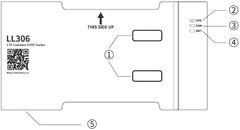
 Appearance

- Door status detection button
- GPS LED
- GSM LED
- Power LED
- Micro USB charging port
- Installation/Remove detection button
- Battery/SIM
SIM card
Installation
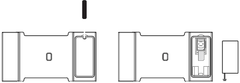
If the device comes without SIM card, please install the SIM card first. Please see the following pictures for SIM card installation.
- Remove the screw on the back cover of the device and take out the battery.
- Insert the SIM card.
- Put back the battery and cover, finally lock the screws.

Operation and functions
Battery·
- Before installing the device, momentarily press the installation detection button, the power indicator will light up. If the battery is less than 80%, the power LED will flash (0.6s on and 2s off) 5 times before off. If the battery is more than 80%, power LED will be off after 10 seconds.
- If the battery is low, please use the 5V/2A Micro USB charger to charge the device.
Installation and power on

- Before closing the container door, attach the device to the right doorpost of the container (See above picture).
- The device will automatically turn on and the LED indicator will light up after installed.
- If the green LED flickers (0.2s on, 1s off), this indicates the device has been successfully connected to the network. Close the container door and view the location of your container on the monitoring platform.
LED
 SOS numbers setting
- Add SOS number
SMS command:
SOS,A, number1, number2, number3 # (A means add phone number).
You could set 3 SOS numbers in maximum. If set successfully, the terminal will reply “OK”.
e. g.
SOS,A, 13510****60,135116****6,136126****8# (set all 3 SOS numbers)
SOS,A, 13510****60# (set the first SOS number)
SOS,A, ,135116****6# (set the second SOS number)
SOS,A, , ,136126****8# (set the third SOS number) - Delete SOS number
SOS,D,1,2,3# (D means delete SOS number)
e. g.
SOS,D,1# means delete the first number
SOS,D,3# means delete the third number
If you do not know the sequence number, you can also delete the number by SMS command like this: SOS,D, number#
e.g.
SOS,D,13527852360# means delete this SOS number directly. It will reply “OK” if the number is deleted successfully.
Working modes
- Automatic switching (default)
The device automatically identify the current environmental of the container, and changes the mode between static mode, land transportation mode, and sea transportation mode.
- Manual switching
After the device is activated for the first time, it enters the static mode by default.
Mode switching instruction
SMS command for mode switching:
MODE,X#
X=0, automatic switching
X=1, static mode
X=2, land transportation mode
X=3, sea transportation mode
Default: X=0
- Query current mode
MODE#
Note:
For automatic switching, the device will work as the following flow chart shows. In manual switching mode, the device will not work according to the flow chart.
- Different working modes has different GPS positioning intervals. Positioning and upload interval setting commands are as follows: MODESET, A, B, C, D#
A is the positioning and upload interval in static mode. Ranges: 5-1440 minutes. The default is 180 minutes.
B is the positioning and reporting interval of land transportation mode. Range: 5-1440 minutes. The default is 10 mintes.
C is the positioning time interval for sea transportation mode. Range: 5-1440 minutes, and the default is 180 minutes.
D is the reporting interval for sea transportation mode. Range: 5-1440 minutes, and the default is 720 minutes.
Installation/remove alert
- Alert and real-time location will be sent if the device is installed or removed.
Door open/close alert
- Alert and real-time location will be sent if the container’s door is opened or closed.
Low battery alert
- Alert and real-time location will be sent if the device battery is low.
Working mode switch alert
- When the device’s working mode changes, the device will send a mode switching notification. See the following notification contents:
| Previous status | Current status | Notification content |
| Static mode | Sea transportation mode | Start shipping |
| Static mode | Land transportation mode | Start transport |
| Sea transportation mode | Static mode |
Stop shipping |
| Land transportation mode | Static mode |
Stop transport |
FCC
FCC Warning:
NOTE: This equipment has been tested and found to comply with the limits for a Class B digital device, pursuant to part 15 of the FCC Rules. These limits are designed to provide reasonable protection against harmful interference in a residential installation. This equipment generates uses and can radiate radio frequency energy and, if not installed and used in accordance with the instructions, may cause harmful interference to radio communications. However, there is no guarantee that interference will not occur in a particular installation. If this equipment does cause harmful interference to radio or television reception, which can be determined by turning the equipment off and on, the user is encouraged to try to correct the interference by one or more of the following measures:
- Reorient or relocate the receiving antenna.
- Increase the separation between the equipment and receiver.
- Connect the equipment into an outlet on a circuit different from that to which the receiver is connected.
Returns Policy
You may return most new, unopened items within 30 days of delivery for a full refund. We'll also pay the return shipping costs if the return is a result of our error (you received an incorrect or defective item, etc.).
You should expect to receive your refund within four weeks of giving your package to the return shipper, however, in many cases you will receive a refund more quickly. This time period includes the transit time for us to receive your return from the shipper (5 to 10 business days), the time it takes us to process your return once we receive it (3 to 5 business days), and the time it takes your bank to process our refund request (5 to 10 business days).
If you need to return an item, simply login to your account, view the order using the "Complete Orders" link under the My Account menu and click the Return Item(s) button. We'll notify you via e-mail of your refund once we've received and processed the returned item.
Shipping
We can ship to virtually any address in the world. Note that there are restrictions on some products, and some products cannot be shipped to international destinations.
When you place an order, we will estimate shipping and delivery dates for you based on the availability of your items and the shipping options you choose. Depending on the shipping provider you choose, shipping date estimates may appear on the shipping quotes page.
Please also note that the shipping rates for many items we sell are weight-based. The weight of any such item can be found on its detail page. To reflect the policies of the shipping companies we use, all weights will be rounded up to the next full pound.
Related Products
Example product title
- 650 SR
1,150 SR- 650 SR
- Unit price
- per
Example product title
- 650 SR
1,150 SR- 650 SR
- Unit price
- per
Example product title
- 650 SR
1,150 SR- 650 SR
- Unit price
- per
Example product title
- 650 SR
1,150 SR- 650 SR
- Unit price
- per
Example product title
- 650 SR
1,150 SR- 650 SR
- Unit price
- per
Example product title
- 650 SR
1,150 SR- 650 SR
- Unit price
- per
Example product title
- 650 SR
1,150 SR- 650 SR
- Unit price
- per
Example product title
- 650 SR
1,150 SR- 650 SR
- Unit price
- per
Example product title
- 650 SR
1,150 SR- 650 SR
- Unit price
- per
Example product title
- 650 SR
1,150 SR- 650 SR
- Unit price
- per
Recently Viewed Products
Example product title
- 650 SR
1,150 SR- 650 SR
- Unit price
- per
Example product title
- 650 SR
1,150 SR- 650 SR
- Unit price
- per
Example product title
- 650 SR
1,150 SR- 650 SR
- Unit price
- per
Example product title
- 650 SR
1,150 SR- 650 SR
- Unit price
- per
Example product title
- 650 SR
1,150 SR- 650 SR
- Unit price
- per
Example product title
- 650 SR
1,150 SR- 650 SR
- Unit price
- per
Example product title
- 650 SR
1,150 SR- 650 SR
- Unit price
- per
Example product title
- 650 SR
1,150 SR- 650 SR
- Unit price
- per
Example product title
- 650 SR
1,150 SR- 650 SR
- Unit price
- per
Example product title
- 650 SR
1,150 SR- 650 SR
- Unit price
- per
- Choosing a selection results in a full page refresh.